Posts Tagged ‘LPR’

Freitag, 30. Januar 2026

Einen HP Laser MFP 137fnw in CUPS einbinden

Obwohl es natürlich das altehrwürdige LPR und HP JetDirect (9100) Protokoll gäbe, versuche ich heutzutage wenn immer möglich das Internet Printing Protocol (IPP) zu verwenden. Für HP-Drucker lautet der IPP-Endpunkt /ipp/print, und somit die ganze URL:

ipp://192.168.14.100/ipp/print

Was gleichbedeutend ist wie http://192.168.14.100:631/ipp/print.

Öffnet man diese URL im Browser, erscheint folgende Fehlermeldung:

Invalid Request. Some Error

Den über HPs Website heruntergeladenen Linux Universaltreiber (Treiber-Download-Seite, Direktlink uld-hp_V1.00.39.12_00.15.tar.gz) und das dazugehörende PPD habe ich nicht zum Laufen gekriegt: Im CUPS Web-Interface stand etwas von „Filter failure“, und das Log sah folgendermassen äusserst schizophren aus (eine Mischung aus „alles hat funktioniert“ und „komplettversagen“):

...
D [30/Jan/2026:03:14:45 +0100] [Job 1] PID 2058714 (/usr/lib/cups/backend/http) exited with no errors.
D [30/Jan/2026:03:14:45 +0100] [Job 1] **** Error: Page drawing error occurred.
D [30/Jan/2026:03:14:45 +0100] [Job 1] Could not draw this page at all, page will be missing in the output.
D [30/Jan/2026:03:14:45 +0100] [Job 1] Rendering completed
D [30/Jan/2026:03:14:45 +0100] [Job 1] PID 2058712 (/usr/lib/cups/filter/gstoraster) exited with no errors.
D [30/Jan/2026:03:14:45 +0100] [Job 1] End of messages
...

Leider habe ich es nicht geschafft herauszufinden, woher Could not draw this page at all, page will be missing in the output. konkret stammte, und wie die Fehlermeldung verursacht wird. Meine aktuelle Vermutung: Debian Trixie, die installierte Ghostscript-Version sowie der Treiber können es nicht miteinander.

Exkurs: gstoraster ist im Debian-Paket cups-filters enthalten (Debian Package Search), und gemäss github.com/richud/gstoraster handelt es sich um einen (minimalen?) Ghostscript-Wrapper. Zwischenfrage: Wieso einen Druckauftrag überhaupt auf dem Linux-Druckserver rastern, wenn das der Drucker selber kann?

Item. Man kann die ausführbare Datei aufrufen, und sie gibt folgendes zurück:

$ /usr/lib/cups/filter/gstoraster --help
ERROR: /usr/lib/cups/filter/gstoraster job-id user title copies options [file]

Ausdrucke funktionierten, wenn ich den von CUPS mitgelieferten generischen PCL6-Treiber als Treiber auswählte. Doch eigentlich möchte ich anno domini 2026 Druckaufträge in Form von PDFs direkt an den Drucker senden, und nicht zuerst noch von CUPS nach PCL6 konvertieren.

Die Lösung: Als Druckertreiber wähle man IPP EverywhereTM aus. Damit sollte heutzutage jeder etwas neuere Drucker ansprechbar sein, ohne Treiber- und sonstiges Ghostscript-Gedöns.

Spannend: Ich wusste bis heute nicht, dass dieser generische Standardtreiber aus AirPrint entstanden ist, Apples Lösung um von iPhone und iPad aus zu drucken, ohne auf diesen Geräten irgendwelche Druckertreiber installieren zu müssen. Fantastisch! Danke Apple.
Tags: , , , , , , , , , ,
Labels: Linux

Keine Kommentare | neuen Kommentar verfassen

Sonntag, 3. November 2013

(Aus dem Archiv) Setting up a Virtual Postscript Network Printer on Windows

Der vorliegende Artikel habe ich ursprünglich irgendwann einmal ab 2002 auf meinem damaligen Linux-Entwicklungsserver im Web publiziert. Da ich das bloggen erst 2005 entdeckt habe, waren die Tipps in einer grossen HTML-Seite untergebracht. Anlässlich einer Aufräumaktion auf dem Server habe ich mich entschieden, die „Perlen“ über meine heutige Kommunikationsplattform ins Web zu posaunen. Seitdem ich die Artikel verfasst habe, sind viele Tage ins Land gegangen — ob der Artikel noch Gültigkeit hat, entscheidet der geneigte Leser selber.

This installation instructions were compiled of several pages I’ve found on the web. Since i’m using Windows 2003, the screenshots may be up to date and valid for Windows 2000 Professional/Server, Windows XP Home/Professional.

The Task

I wanted to make my Brother HL-760 compatible with Mac OS X – unfortunately, Brother gives no driver support for this platform. There is a solution with GIMP-Print, which didn’t satisfy me at all (it’s a bit tricky, graphics get badly dithered). Fortunately, the HL-760 supports a printing standard at all – PCL. This helped a lot. I’m not sure wheter this print-server could print to any printer which has driver-support on windows?

The Printing Process

After you’ve set up the virtual printer, you can install a Postscript-Compatible driver on mostly any known workstation (like Mac OS, Mac OS X, Linux, …) and print to to the Windows-Server (first try to use LPR because it’s an open standard). The postscript-data received by the server is being processed by Ghostscript, converted to PCL (proprietary HP Printing Language) and finally sent to the Brother HL-760.

The Requirements

You need the following software, available for free:

  • Other Network File and Print Services
    A windows component provided for free by Microsoft; available at least since Windows 2000 (see Microsoft Knowledgebase for installation instructions)
  • TCP/IP print server service is set up to start up automatically
  • Ghostscript
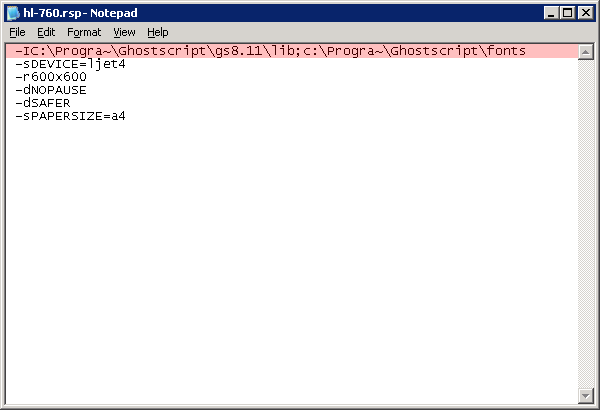
    Converts Postscript-Files to other Formats like PCL or PDF (with a few changes to the printer.rsp-File, you can build a free PDF-Printer with no cost!).
  • RedMon
    Short for ‚Port Redirection Monitor‘. Redirects data received on a Printer-Port to another printer and allows to pre-process the data.

The Installation Screenshots

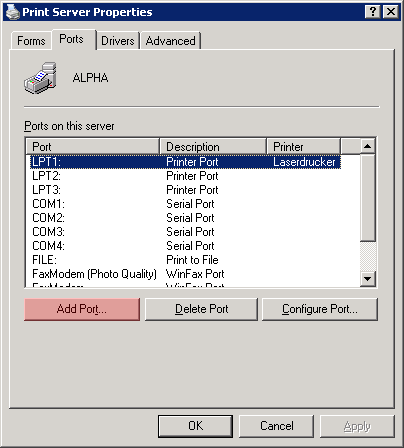
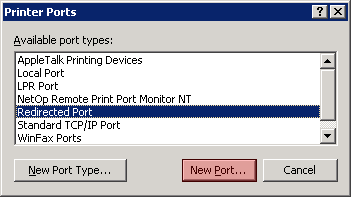
After you’ve successfully installed Ghostscript and RedMon you’re ready to set up and configure your print-server. (Please note that these screenshots were made on my server at home and therefore reflect my environment. It may vary from yours, but as you’re obviously kinda pro who got to my page, you should be able to perform the necessary translations with ease).

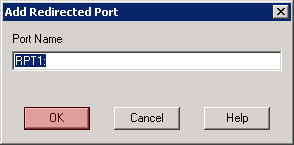
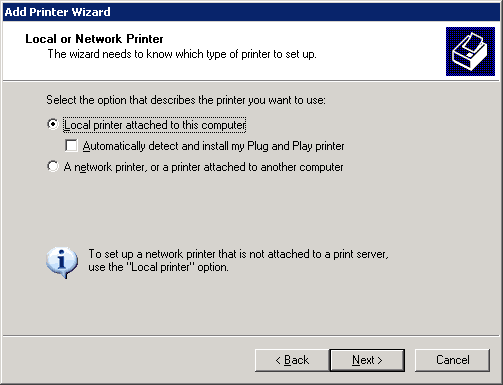
setup_rpt_01

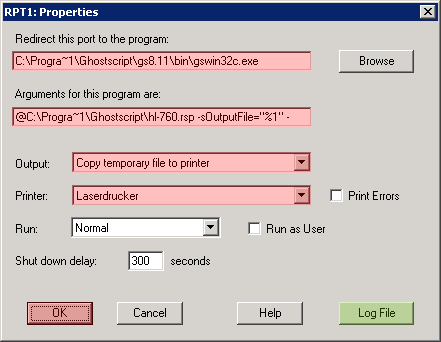
setup_rpt_02

setup_rpt_03

setup_rpt_04

Error Logging was essential after the first test runs didn’t work as expected. The error messages stored to the error log file did help a lot fixing problems (pathnames with spaces, as example).

setup_rpt_05

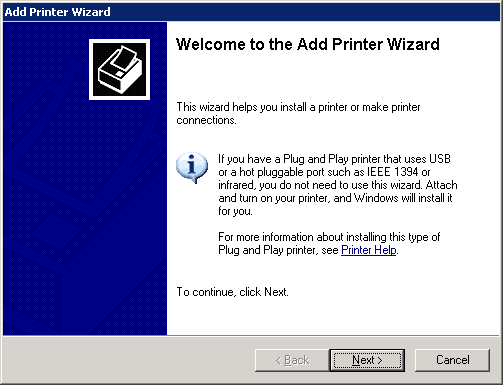
After you’ve successfully set up RedMon and Ghostscript, you need to set up a new printer.

setup_rpt_06

setup_rpt_07

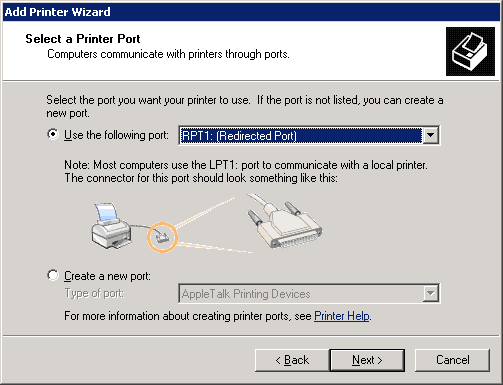
setup_rpt_08

This is the clue: You need to assign not a physical, but a virtual port to the printer – the RPT1:, set up above.

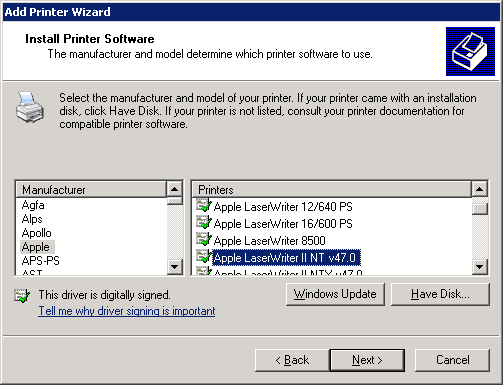
setup_rpt_09

It is essential that you create a postscript-compatible Printer, whereby the Apple Laserwriter II is recommended.

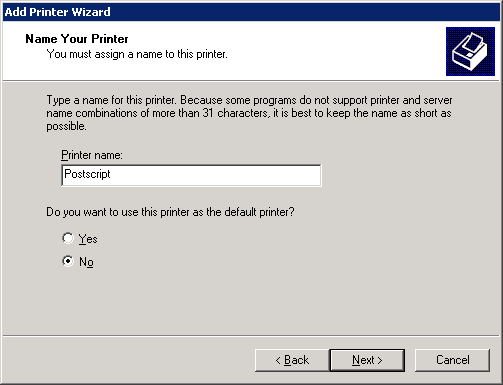
setup_rpt_10

I called the printer ‚Postscript‘ to avoid having troubles with spaces and special-chars in LPR-Queue-Names, which could confuse UNIX operating systems (?).

Tags: , , , ,
Labels: IT

Keine Kommentare | neuen Kommentar verfassen

Sonntag, 3. November 2013

(Aus dem Archiv) Windows 2000 and Windows XP as LPD Server

Der vorliegende Artikel habe ich ursprünglich irgendwann einmal ab 2002 auf meinem damaligen Linux-Entwicklungsserver im Web publiziert. Da ich das bloggen erst 2005 entdeckt habe, waren die Tipps in einer grossen HTML-Seite untergebracht. Anlässlich einer Aufräumaktion auf dem Server habe ich mich entschieden, die „Perlen“ über meine heutige Kommunikationsplattform ins Web zu posaunen. Seitdem ich die Artikel verfasst habe, sind viele Tage ins Land gegangen — ob der Artikel noch Gültigkeit hat, entscheidet der geneigte Leser selber.

You can turn your Windows 2000 and Windows XP-Clients in a LPD Server at ease:

  1. Just make sure you have the Other Network File and Print Services components installed.
  2. Set the TCP/IP print server service to startup automatically

According to www.uark.edu

Tags: , ,
Labels: IT

Keine Kommentare | neuen Kommentar verfassen

Sonntag, 3. November 2013

(Aus dem Archiv) Default LPR Queue Names of different Vendors

Der vorliegende Artikel habe ich ursprünglich irgendwann einmal ab 2002 auf meinem damaligen Linux-Entwicklungsserver im Web publiziert. Da ich das bloggen erst 2005 entdeckt habe, waren die Tipps in einer grossen HTML-Seite untergebracht. Anlässlich einer Aufräumaktion auf dem Server habe ich mich entschieden, die „Perlen“ über meine heutige Kommunikationsplattform ins Web zu posaunen. Seitdem ich die Artikel verfasst habe, sind viele Tage ins Land gegangen — ob der Artikel noch Gültigkeit hat, entscheidet der geneigte Leser selber.

List

Windows with LPR-Support: Use the name of the printer as it appears in Start > Settings > Printers (don’t know whether spaces and special chars cause problems).

Tags: , , ,
Labels: IT

Keine Kommentare | neuen Kommentar verfassen